
Generate horizontal bar charts of the risk estimates generated
from estimate_risk()
Usage
plot_risk(
  risk_dat,
  add_to_dat = TRUE,
  collapse = is.data.frame(risk_dat),
  progress = TRUE,
  outcomes = "all",
  color_scheme = "single",
  color_dat = get_default_color("single"),
  color_for_last_group = get_default_color("threshold_final"),
  annotation = "all",
  legend = TRUE,
  lines = TRUE,
  line_text = TRUE,
  base_size = 12
)
Arguments
- risk_dat
Data frame or list of data frames (required). This either needs to be from the output of
estimate_risk()/est_risk()or needs to match the output format ofestimate_risk()/est_risk(). If you wish to match the output format ofestimate_risk()/est_risk(), the minimum required columns are at least one of the risk estimation columns (total_cvd,ascvd,heart_failure,chd, orstroke) and the columnsover_yearsandmodel. Additionally, if you are passing a data frame of risk estimates for multiple people/instances, thepreventr_idcolumn is required to differentiate them. For eachpreventr_idgroup, there must be no more than one PREVENT model row for each possible time horizon and no more than two PCE comparison rows (one for each of the original PCEs and the revised PCEs). Ifpreventr_idis absent from the data frame, estimation must be for a single person only, thus meaning the previously-mentioned row-composition rules apply to the full input data frame. PCE comparison rows can obviously only be for the 10-year time horizon and for the outcome of ASCVD. If you pass a list of data frames, the structure needs to be correct as well: the names of the list elements must berisk_est_10yrandrisk_est_30yr, each data frame must have no more rows than there are possible models that could be run for each time horizon for a single person (i.e., 3 for 10-year risk and 1 for 30-year risk), andpreventr_idmust not be present in the data frames. The columninput_problemsis used to display a warning subtitle when estimating 30-year risk for individuals over 59 years of age; in all other cases, this column is ignored. See the vignette "plot-risk" for further discussion.- add_to_dat
Logical (optional behavior variable): Whether to add the plots as a list column to the input passed via
risk_dat, eitherTRUEorFALSE(the default isTRUE). This argument is strict, so 1 or 0 are not accepted, and moreover, anything other thanTRUEwill be treated asFALSE. IfTRUE,plot_risk()will return the plots in a newly-created list-column containing the plots; ifFALSE,plot_risk()will return the plots directly and only the plots (no data frame component). See the vignette "plot-risk" for more information.- collapse
Logical (optional behavior variable): Whether to collapse the output into a single data frame if applicable, either
TRUEorFALSE; this argument is strict, so 1 or 0 are not accepted, and moreover, anything other thanTRUEwill be treated asFALSE. This argument is only considered ifadd_to_datisTRUEandrisk_datis a list of data frames (as happens withestimate_risk()/est_risk()when thecollapseargument for that function isFALSE). This maintains consistency with the API forestimate_risk()/est_risk(). See the vignette "plot-risk" for more information.- progress
Logical (optional behavior variable): Whether to display a progress bar during execution, either
TRUE(default) orFALSE. This argument is strict, so 1 or 0 are not accepted, and moreover, anything other thanTRUEwill be treated asFALSE. It requires theutilspackage, which is part of the R distribution (i.e., outside of atypical scenarios, you should not need to install theutilspackage yourself).- outcomes
Character (optional behavior variable): The outcome(s) to plot. This should be a character vector listing the outcomes in the order of desired plotting from top to bottom. The default of
"all"gets translated internally toc("total_cvd", "ascvd", "heart_failure", "chd", "stroke"), and it overrides anything else that might be passed tooutcomes.- color_scheme
Character (optional behavior variable): The color scheme to use, one of "single" (the default) or "categories". This argument is interdependent with argument
color_dat.- color_dat
Character or data frame (optional behavior variable): This argument is interdependent with argument
color_scheme.If
color_scheme = "single",color_datshould be a character vector of length 1 specifying the color to use, in a format recognized by R. This includes named colors (e.g., "dodgerblue") or hexadecimal codes (e.g., "#1e90ff"). One can also specify the argument as a call torgb()(which simply returns the hexadecimal color code as a character vector). The default is "#3c8dbc".If
color_scheme = "categories",color_datshould be a data frame with columnsthreshold(numeric, 0.001 <= value <= 0.999) andcolor(character, adhering to specifications delineated for indicating desired color whencolor_scheme = "single").The numeric limits keep thresholds within the range that can be displayed sensibly for proportion estimates rounded to 3 decimal places. One could, of course, easily argue even less extreme values are also not terribly sensible, either, but 0.001 and 0.999 are unequivocal simply based on how risk estimation and plotting work.
The data frame can have up to 3 rows specifying pairs of threshold values and corresponding colors (threshold-color pairs) to use for values below the given threshold.
A final threshold will always be added for values that are at or above the highest valid user-specified threshold in the data frame, and the color for this final threshold can be specified using the
color_for_last_groupargument.Thresholds should ideally be entered in increasing order, but they can technically be entered in any order, as the function will sort them anyway.
The function will disregard threshold-color pairs where the threshold is empty, duplicated, or outside the aforementioned limits. The function will then sort the threshold-color pairs based on the threshold value to prevent problematic requests (e.g., threshold 1 at 0.15 and threshold 2 at 0.10 will be rearranged to 0.10 and 0.15, but the colors entered for those thresholds will be preserved during the sort). At least one valid threshold-color pair must remain after this cleaning.
See the "Details" section and "plot-risk" vignette for further information.
- color_for_last_group
Character (optional behavior variable): The color to use for the de facto last group (i.e., values that fall at or above the highest valid user-specified threshold in the
color_datdata frame). This argument is only considered whencolor_scheme = "categories". The default is "#dd4b39". Entry should adhere to the specifications delineated for indicating desired color whencolor_scheme = "single". See the "Details" section and "plot-risk" vignette as well.- annotation
Character (optional behavior variable): Whether to include all annotation ("all"), no annotation ("none"), or one or more of the components of annotation, which can be one or more of "title", "subtitle", and "caption". The default is "all". Note this does not impact the legend (where applicable).
- legend
Logical (optional behavior variable): Whether to include a legend with the plot, either
TRUEorFALSE(the default isTRUE). This argument is strict, so 1 or 0 are not accepted. This argument is only considered whencolor_scheme = "categories".- lines
Logical (optional behavior variable): Whether to include dashed vertical lines at the threshold values, either
TRUEorFALSE(the default isTRUE). This argument is strict, so 1 or 0 are not accepted. This argument is only considered whencolor_scheme = "categories".- line_text
Logical (optional behavior variable): Whether to include caption text describing the values at which the lines are drawn (i.e., the threshold values), either
TRUEorFALSE(the default isTRUE). This argument is strict, so 1 or 0 are not accepted. This argument is only considered whencolor_scheme = "categories"andlines = TRUE.- base_size
Numeric (optional behavior variable): The base font size to use for the plot. The default is 12. Entries that are not a single, finite, positive number will be discarded in favor of the default.
Value
An object in one of the following formats:
a single ggplot object
a list of ggplot objects
a data frame with ggplots in the column
plota list of data frames with ggplots in the column
plot
Which of these formats is returned depends on the values of the arguments
add_to_dat and collapse and the structure of risk_dat. The table below
summarizes the return format for various input/argument combinations:
Structure of risk_dat | Value of add_to_dat | Value of collapse | Output format |
| data frame | TRUE | not applicable | data frame with plot list-column |
| data frame | FALSE | not applicable | ggplot object or list of ggplot objects |
| list of data frames | TRUE | TRUE | single, collapsed data frame with plot list-column |
| list of data frames | TRUE | FALSE | list of data frames, each with plot list-column |
| list of data frames | FALSE | not applicable | list of ggplot objects |
See the vignette "plot-risk" for more information and examples demonstrating these various return formats.
Details
Specifying color_dat and color_for_last_group when color_scheme = "categories"
See also the color_dat and color_scheme arguments. An example color_dat
data frame might be something like the following:
 color_dat_v1 <- data.frame(
   threshold = 0.075,
   color = "#00A65A"
 )

 # or

 color_dat_v2 <- data.frame(
   threshold = c(0.075, 0.20),
   color = c("#00A65A", "#FFFDAF")
 )

 # or

 color_dat_v3 <- data.frame(
   threshold = c(0.075, 0.20, 0.35),
   color = c("#00A65A", "#FFFDAF", "#FF8C00")
 )

 # Not-great entries that will be cleaned

 color_dat_why_v1 <- data.frame(
   threshold = c(0.075, 0.20, 0.20),
   color = c("#00A65A", "#FFFDAF", "#FF8C00")
 )

 color_dat_why_v2 <- data.frame(
   threshold = c(0.35, 0.075, 1.5),
   color = c("#00A65A", "#FFFDAF", "#FF8C00")
 )
In all the above cases, users can specify color_for_last_group, and
plot_risk() will automatically assign that color to values at or above the
highest valid user-specified threshold. For example, suppose color_for_last_group
is set as "#dd4b39" (this is also the default color for this argument). Using
the above examples:
For
color_dat_v1, "#00A65A" will be applied for values below 0.075, and "#dd4b39" will be applied for values at or above 0.075.For
color_dat_v2, "#00A65A" will be applied for values below 0.075, "#FFFDAF" will be applied for values at or above 0.075 and below 0.20, and "#dd4b39" will be applied for values at or above 0.20.For
color_dat_v3, "#00A65A" will be applied for values below 0.075, "#FFFDAF" will be applied for values at or above 0.075 and below 0.20, "#FF8C00" will be applied for values at or above 0.20 and below 0.35, and "#dd4b39" will be applied for values at or above 0.35.For
color_dat_why_v1, the function will clean the data frame to remove the duplicate threshold value, and the result will be the same ascolor_dat_v2.For
color_dat_why_v2, the function will clean the data frame to remove the invalid threshold value of 1.5, then the thresholds will be arranged in increasing order, so the final result will be threshold 1 being at 0.075 with color "#FFFDAF", threshold 2 being at 0.35 with color "#00A65A", and the final group being at or above 0.35 with color "#dd4b39".
Examples
res <- estimate_risk(
age = 50,
sex = "female",
sbp = 160,
bp_tx = TRUE,
total_c = 200,
hdl_c = 45,
statin = FALSE,
dm = TRUE,
smoking = FALSE,
egfr = 90,
bmi = 35
)
#> PREVENT estimates are from: Base model.
plot_risk(res, add_to_dat = FALSE)
#>
|
| | 0%
|
|=================================== | 50%
|
|======================================================================| 100%
#> $risk_est_10yr
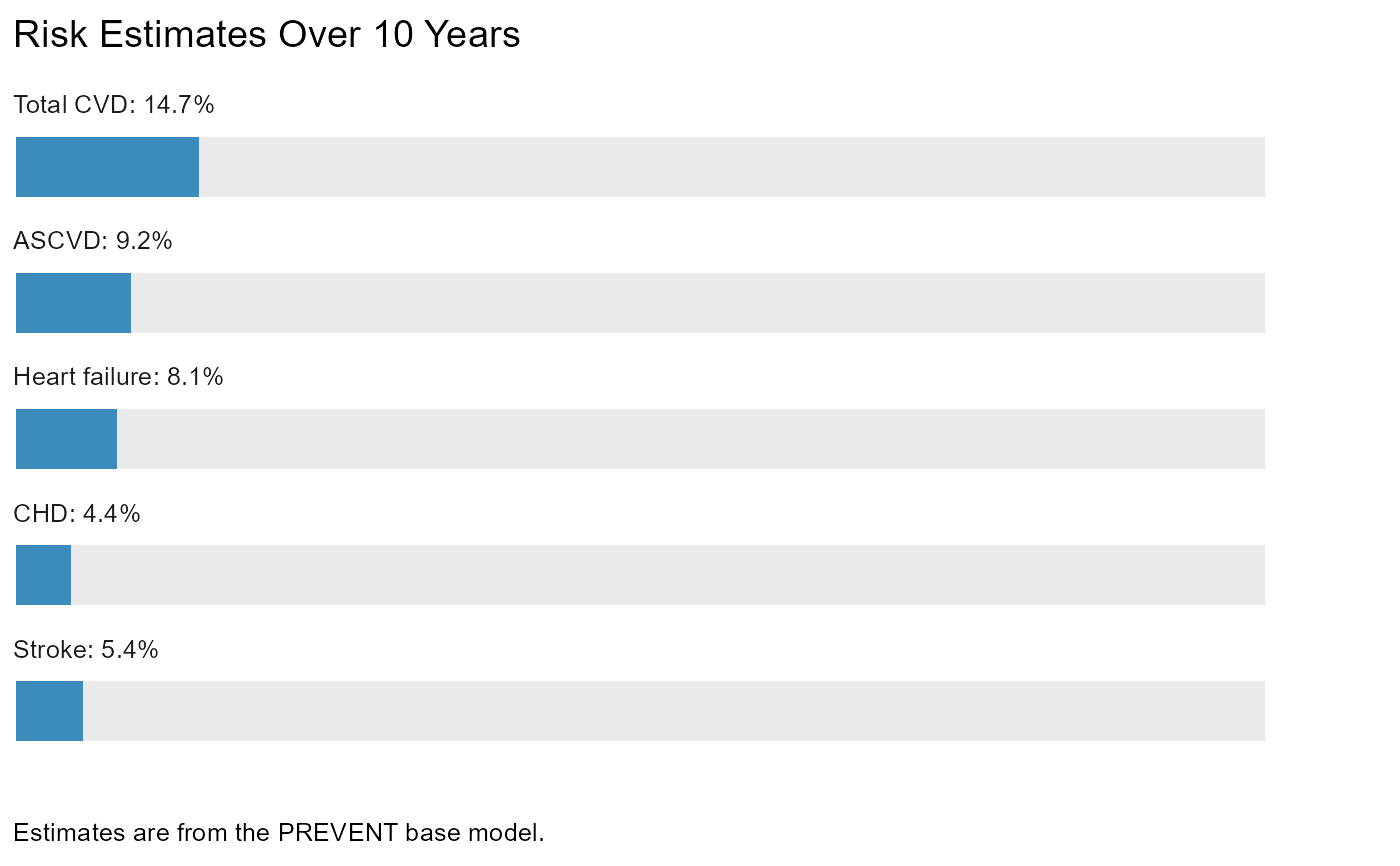 #>
#> $risk_est_30yr
#>
#> $risk_est_30yr
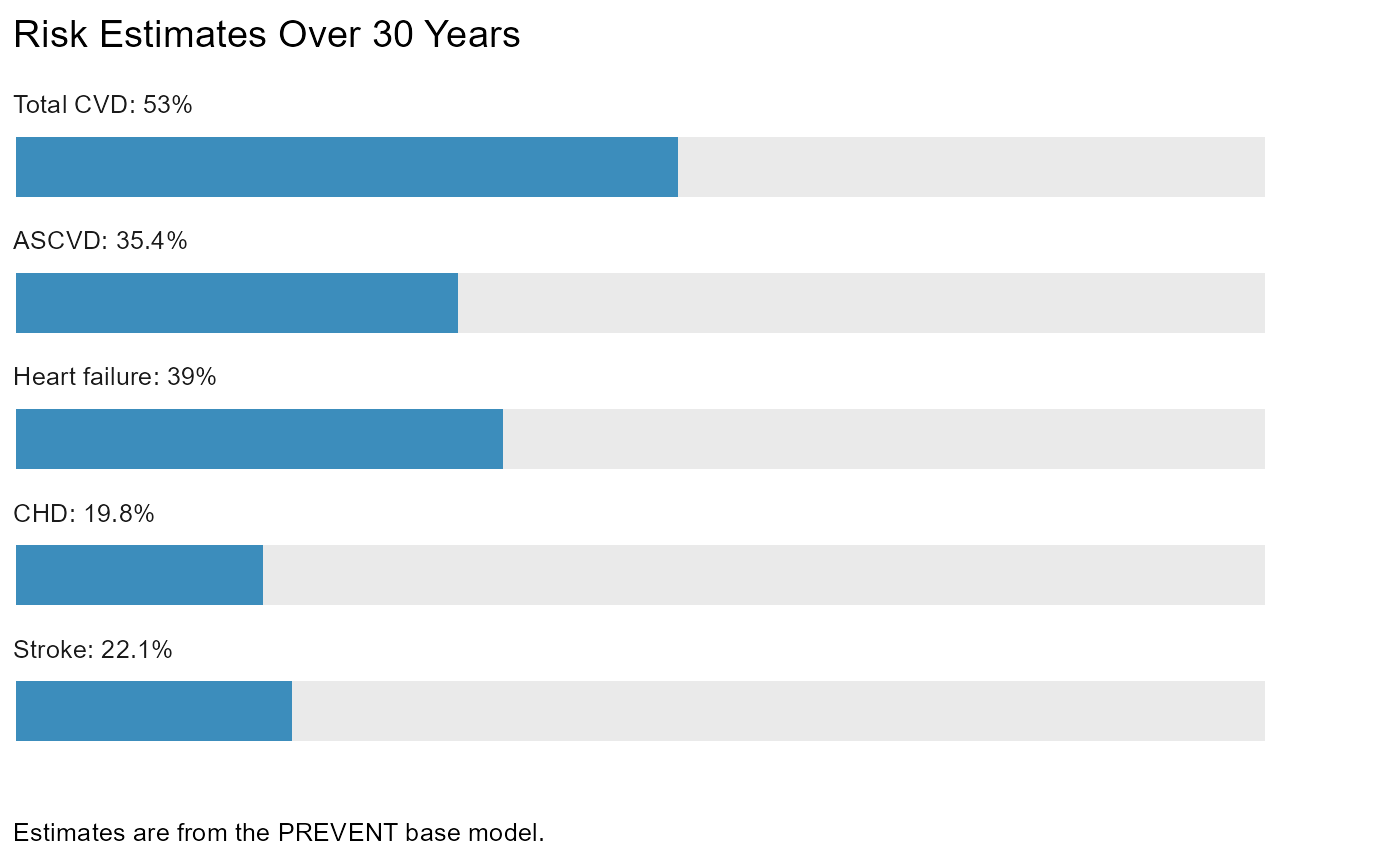 #>
# Remove annotation
plot_risk(res, annotation = "none", add_to_dat = FALSE)
#>
|
| | 0%
|
|=================================== | 50%
|
|======================================================================| 100%
#> $risk_est_10yr
#>
# Remove annotation
plot_risk(res, annotation = "none", add_to_dat = FALSE)
#>
|
| | 0%
|
|=================================== | 50%
|
|======================================================================| 100%
#> $risk_est_10yr
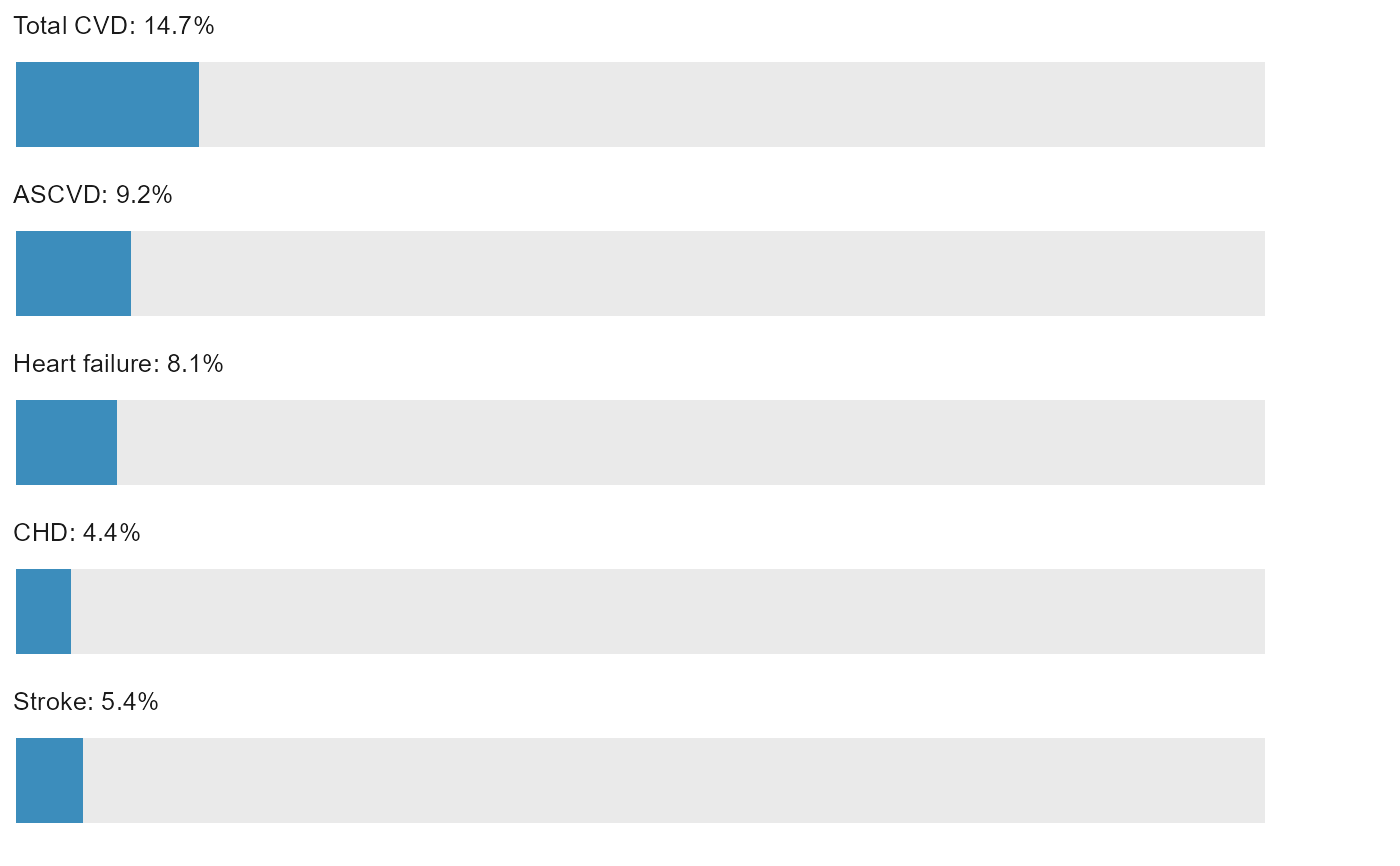 #>
#> $risk_est_30yr
#>
#> $risk_est_30yr
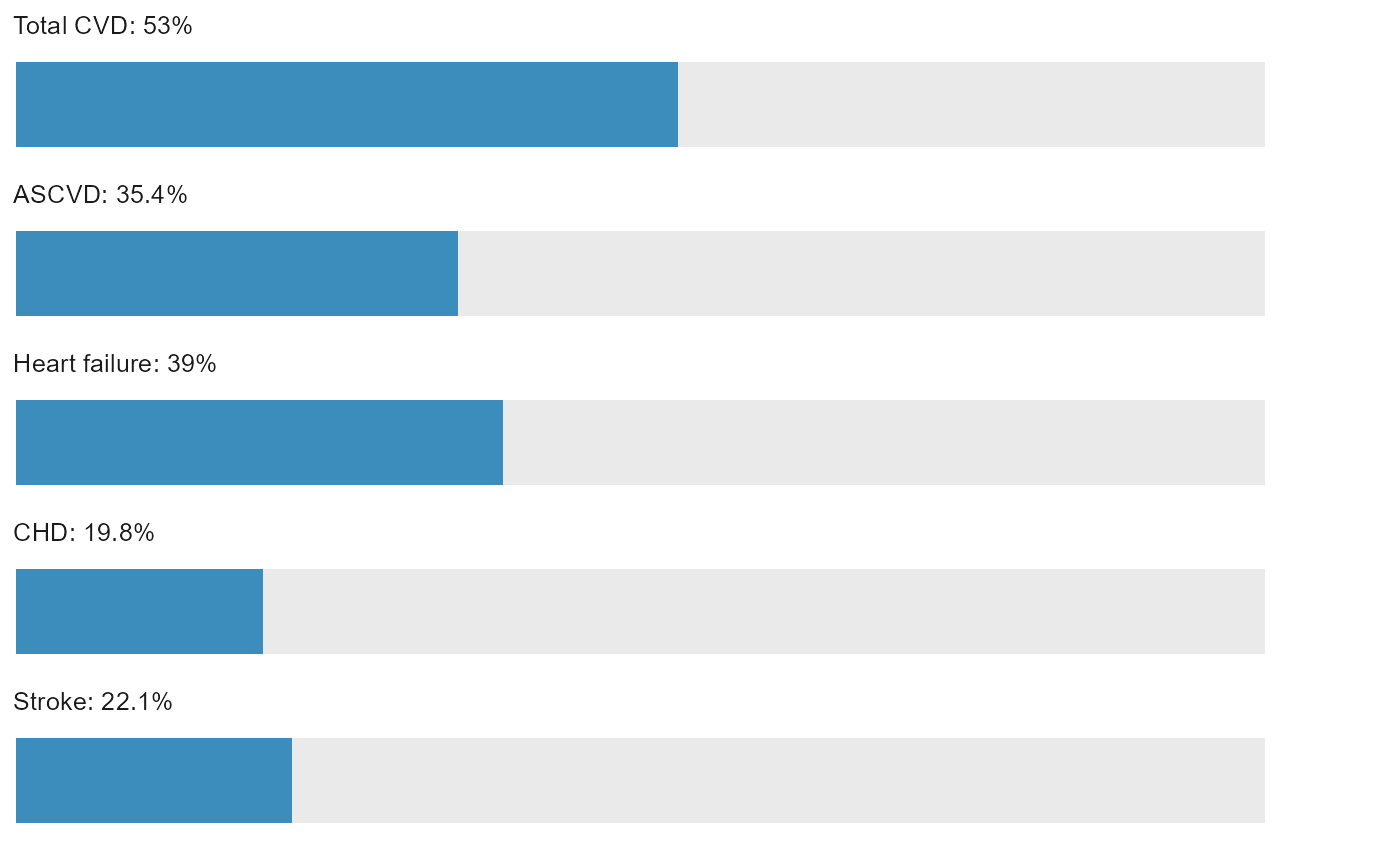 #>
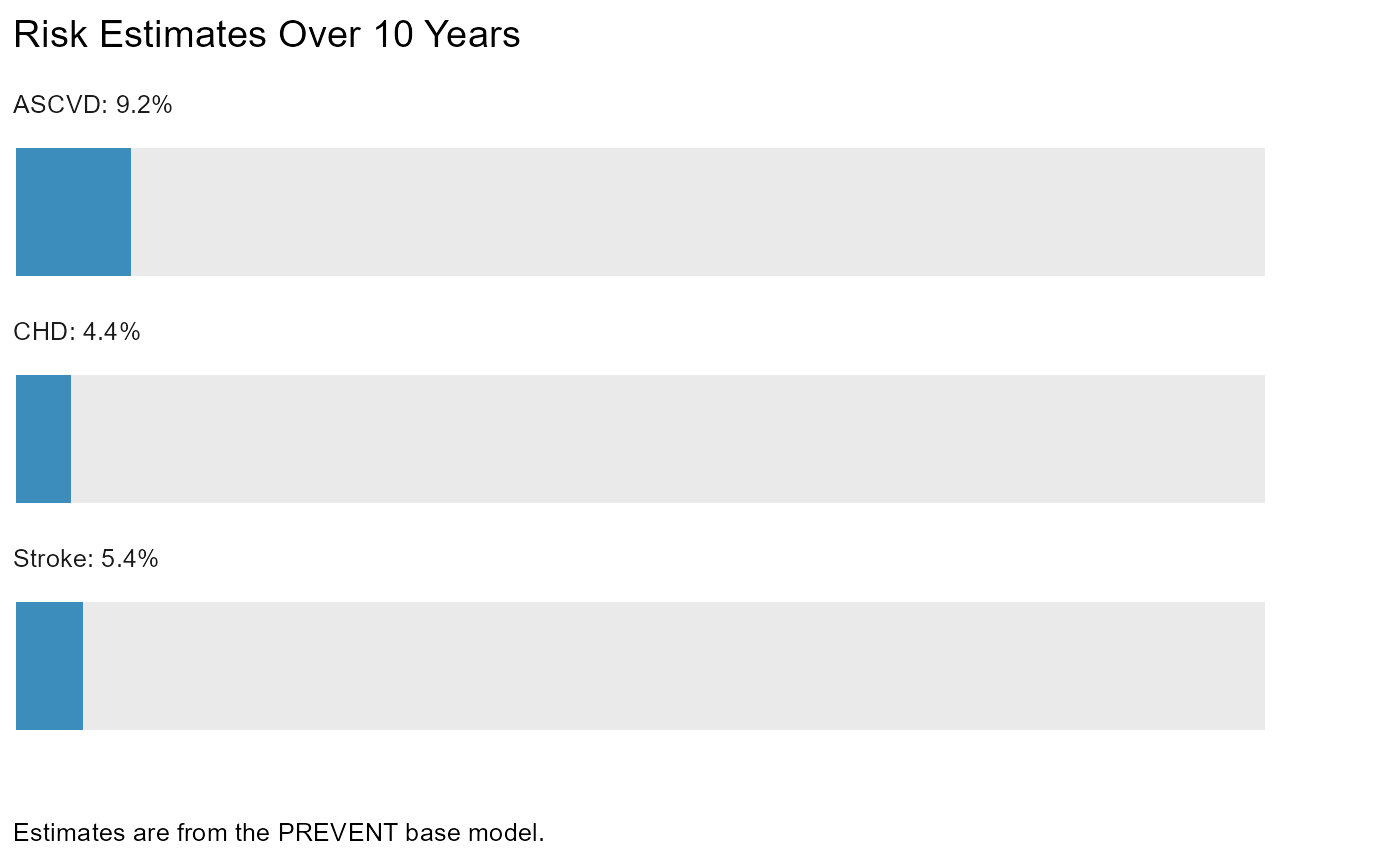
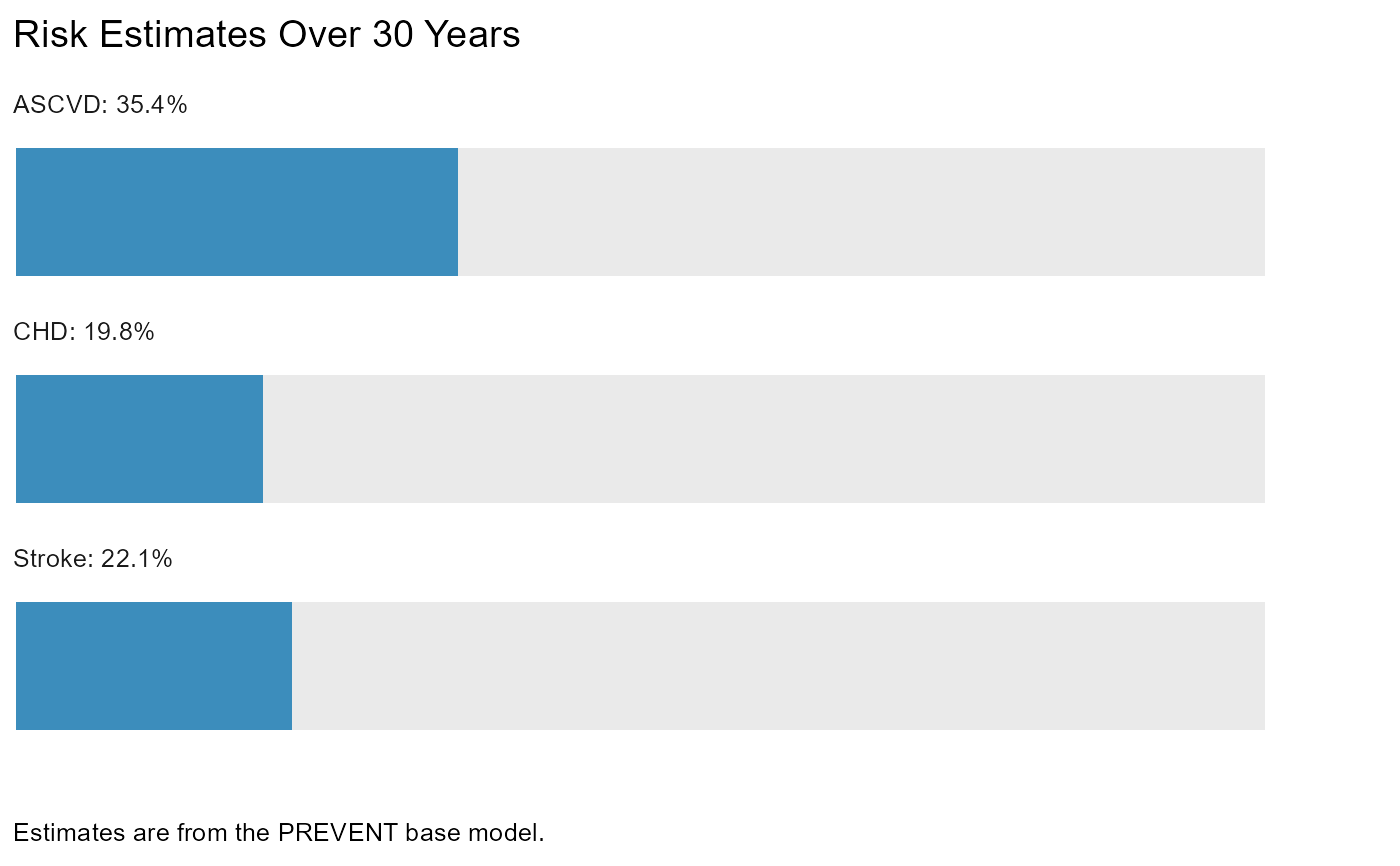
# Plot only a subset of the outcomes
# (e.g., excluding total CVD and heart failure)
plot_risk(
res,
outcomes = c("ascvd", "chd", "stroke"),
add_to_dat = FALSE
)
#>
|
| | 0%
|
|=================================== | 50%
|
|======================================================================| 100%
#> $risk_est_10yr
#>
# Plot only a subset of the outcomes
# (e.g., excluding total CVD and heart failure)
plot_risk(
res,
outcomes = c("ascvd", "chd", "stroke"),
add_to_dat = FALSE
)
#>
|
| | 0%
|
|=================================== | 50%
|
|======================================================================| 100%
#> $risk_est_10yr
 #>
#> $risk_est_30yr
#>
#> $risk_est_30yr
 #>
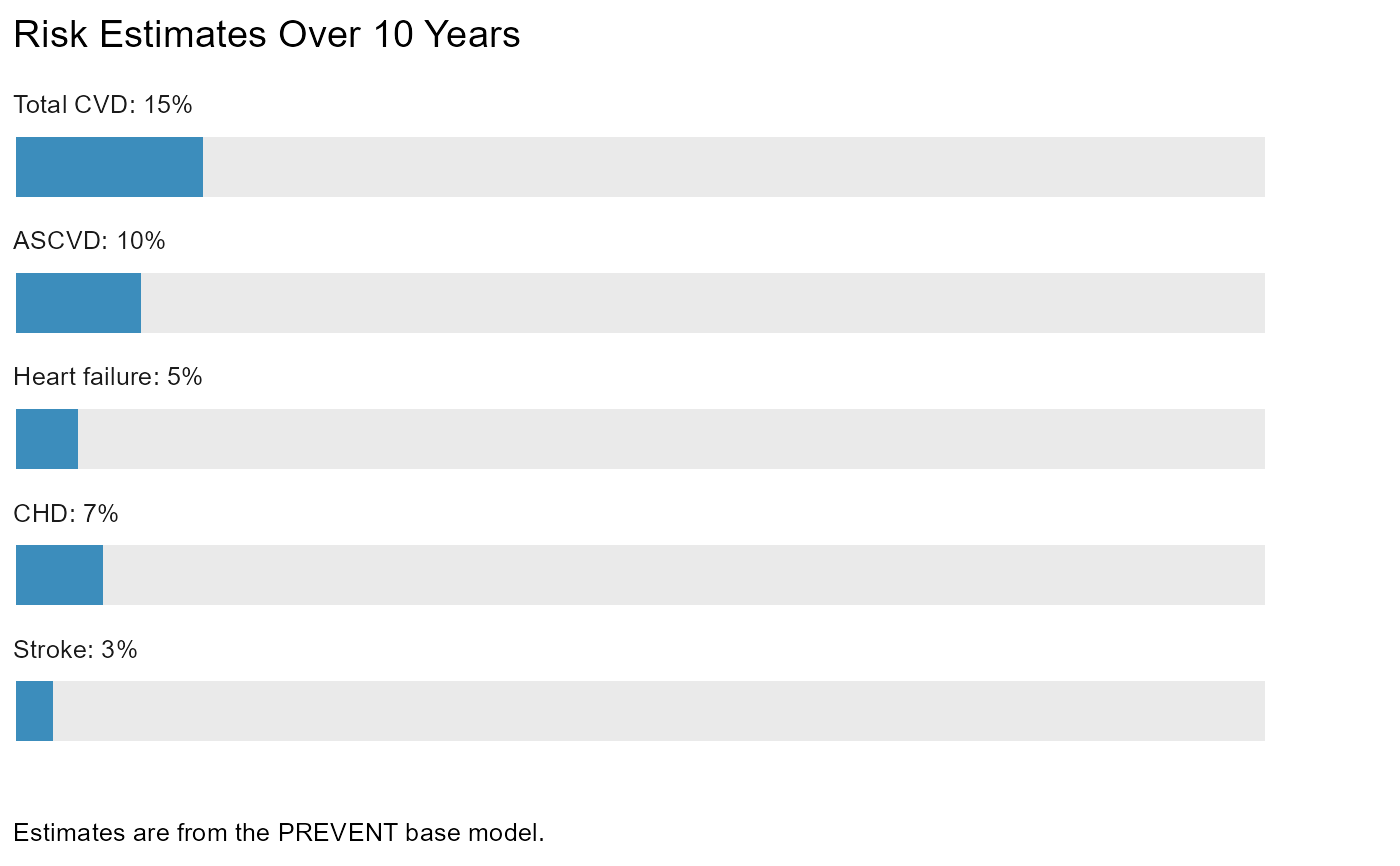
# Need to plot risk estimates you already have? No problem.
risk_dat <- data.frame(
total_cvd = 0.15,
ascvd = 0.10,
heart_failure = 0.05,
chd = 0.07,
stroke = 0.03,
model = "base",
over_years = 10
)
plot_risk(risk_dat, add_to_dat = FALSE)
#>
# Need to plot risk estimates you already have? No problem.
risk_dat <- data.frame(
total_cvd = 0.15,
ascvd = 0.10,
heart_failure = 0.05,
chd = 0.07,
stroke = 0.03,
model = "base",
over_years = 10
)
plot_risk(risk_dat, add_to_dat = FALSE)
 # Rest of examples limited to interactive sessions
if (FALSE) { # interactive()
res_10yr <- res$risk_est_10yr
res_30yr <- res$risk_est_30yr
# Change color for `color_scheme = "single"`
plot_risk(
res_10yr,
color_scheme = "single",
color_dat = "darkgreen",
add_to_dat = FALSE
)
# Use `color_scheme = "categories"`
color_dat <- data.frame(
threshold = c(0.075, 0.20),
color = c("#00A65A", "#FF8C00")
)
plot_risk(
res_30yr,
color_scheme = "categories",
color_dat = color_dat,
add_to_dat = FALSE
)
# Change color for final group
plot_risk(
res_30yr,
color_scheme = "categories",
color_dat = color_dat,
color_for_last_group = "maroon",
add_to_dat = FALSE
)
# Remove legend
plot_risk(
res_10yr,
color_scheme = "categories",
color_dat = color_dat,
legend = FALSE,
add_to_dat = FALSE
)
# Remove legend and lines
plot_risk(
res_10yr,
color_scheme = "categories",
color_dat = color_dat,
legend = FALSE,
lines = FALSE,
add_to_dat = FALSE
)
# Remove legend and line text (but keep lines)
plot_risk(
res_10yr,
color_scheme = "categories",
color_dat = color_dat,
legend = FALSE,
line_text = FALSE,
add_to_dat = FALSE
)
# Run `plot_risk()` on a data frame of results from
# `estimate_risk()`/`est_risk()`
dat <- data.frame(
age = c(40, 50, 60),
sex = c("female", "female", "male"),
sbp = c(160, 120, 140),
bp_tx = c(TRUE, TRUE, FALSE),
total_c = c(200, 189, 156),
hdl_c = c(45, 42, 38),
statin = c(FALSE, TRUE, TRUE),
dm = c(TRUE, FALSE, TRUE),
smoking = c(FALSE, TRUE, FALSE),
egfr = c(90, 85, 88),
bmi = c(35, 22, 28)
)
res <- estimate_risk(use_dat = dat)
plot_risk(res, add_to_dat = FALSE) # Returns plots
plot_risk(res) # Returns data frame `plot` list-column
# Because the plots are ggplot objects, they can be further customized
# like any other ggplot object.
res_10yr <- estimate_risk(use_dat = dat[1, ], time = 10)
# Customization via {ggplot2}
p <- plot_risk(res_10yr, add_to_dat = FALSE)
# Note `labs()`, `theme()`, and `margin()` are from {ggplot2}, so one would
# need to get access to them via, e.g., `library(ggplot2)`, `ggplot2::` prefixing,
# `importFrom()` (if developing a package; for example, {preventr} `importFrom()`s
# all three), etc.
p +
ggplot2::labs(title = "Lorem ipsum") +
ggplot2::theme(plot.margin = ggplot2::margin(20, 20, 20, 20))
# etc.
# It is also easy to combine the 10- and 30-year plots if desired, e.g.,
# via packages like {patchwork} with functions like `patchwork::wrap_plots()`,
# and there are many additional options for composing plots via {patchwork}.
}
# Rest of examples limited to interactive sessions
if (FALSE) { # interactive()
res_10yr <- res$risk_est_10yr
res_30yr <- res$risk_est_30yr
# Change color for `color_scheme = "single"`
plot_risk(
res_10yr,
color_scheme = "single",
color_dat = "darkgreen",
add_to_dat = FALSE
)
# Use `color_scheme = "categories"`
color_dat <- data.frame(
threshold = c(0.075, 0.20),
color = c("#00A65A", "#FF8C00")
)
plot_risk(
res_30yr,
color_scheme = "categories",
color_dat = color_dat,
add_to_dat = FALSE
)
# Change color for final group
plot_risk(
res_30yr,
color_scheme = "categories",
color_dat = color_dat,
color_for_last_group = "maroon",
add_to_dat = FALSE
)
# Remove legend
plot_risk(
res_10yr,
color_scheme = "categories",
color_dat = color_dat,
legend = FALSE,
add_to_dat = FALSE
)
# Remove legend and lines
plot_risk(
res_10yr,
color_scheme = "categories",
color_dat = color_dat,
legend = FALSE,
lines = FALSE,
add_to_dat = FALSE
)
# Remove legend and line text (but keep lines)
plot_risk(
res_10yr,
color_scheme = "categories",
color_dat = color_dat,
legend = FALSE,
line_text = FALSE,
add_to_dat = FALSE
)
# Run `plot_risk()` on a data frame of results from
# `estimate_risk()`/`est_risk()`
dat <- data.frame(
age = c(40, 50, 60),
sex = c("female", "female", "male"),
sbp = c(160, 120, 140),
bp_tx = c(TRUE, TRUE, FALSE),
total_c = c(200, 189, 156),
hdl_c = c(45, 42, 38),
statin = c(FALSE, TRUE, TRUE),
dm = c(TRUE, FALSE, TRUE),
smoking = c(FALSE, TRUE, FALSE),
egfr = c(90, 85, 88),
bmi = c(35, 22, 28)
)
res <- estimate_risk(use_dat = dat)
plot_risk(res, add_to_dat = FALSE) # Returns plots
plot_risk(res) # Returns data frame `plot` list-column
# Because the plots are ggplot objects, they can be further customized
# like any other ggplot object.
res_10yr <- estimate_risk(use_dat = dat[1, ], time = 10)
# Customization via {ggplot2}
p <- plot_risk(res_10yr, add_to_dat = FALSE)
# Note `labs()`, `theme()`, and `margin()` are from {ggplot2}, so one would
# need to get access to them via, e.g., `library(ggplot2)`, `ggplot2::` prefixing,
# `importFrom()` (if developing a package; for example, {preventr} `importFrom()`s
# all three), etc.
p +
ggplot2::labs(title = "Lorem ipsum") +
ggplot2::theme(plot.margin = ggplot2::margin(20, 20, 20, 20))
# etc.
# It is also easy to combine the 10- and 30-year plots if desired, e.g.,
# via packages like {patchwork} with functions like `patchwork::wrap_plots()`,
# and there are many additional options for composing plots via {patchwork}.
}